Page 86 FTDX1200 Operating Manual

CW CONVENIENCE FEATURES Cont'd

Previous Page    Index of Topics    Table of Contents    Index of Pages    Next Page

CONTEST MEMORY KEYER (USING THE OPTIONAL FH-2 REMOTE CONTROL KEYPAD) Cont'd

TEXT Memory
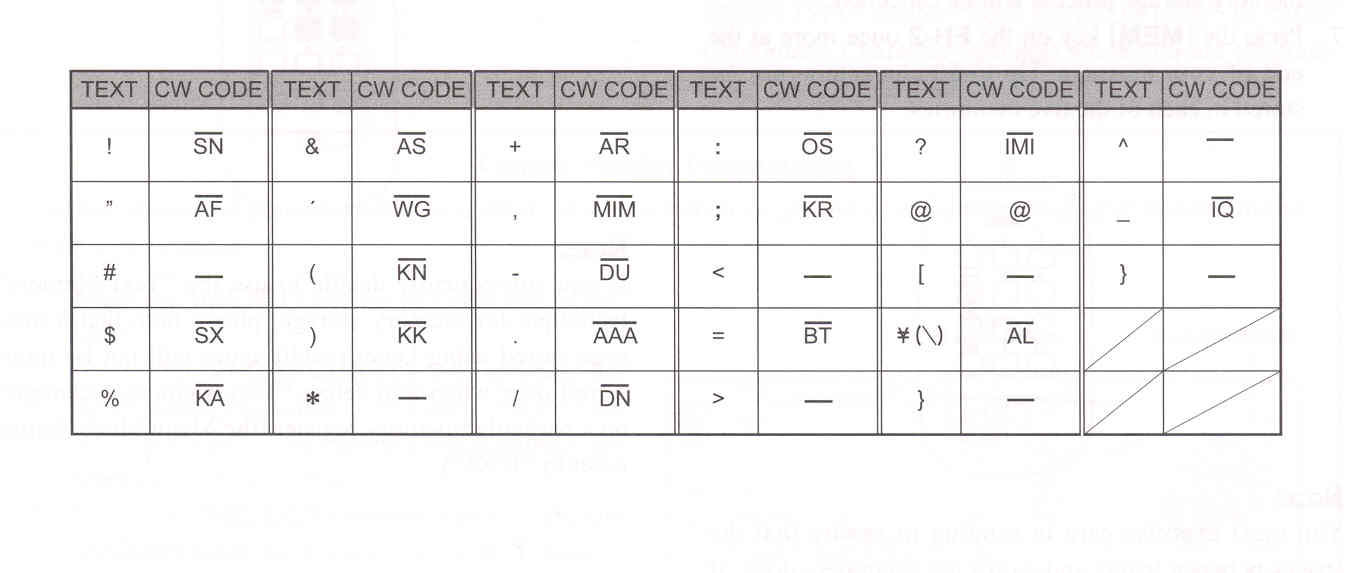
The five channels of CW message memorey (up to 50 characters each) may also be programmed using a text-entry technique. This technique is somewhat slower than when you send the message directly from your keyer paddle, but accuracy of character spaceing is ensured. Be sure to enter the character "}" at the end of texts.

Example 1: CQ CQ CQ DE W6DXC K } (20 characters).

The sequential Contest Number ("Count up") feature is another powerful feature of the CW Memory Keyer.

Example 2: 599 10 200 # K } (15 characters).


Text Message Storage

    1. Press and hold in the [MENU] button for one second to enter the Menu mode.

    2. Rotate the [VFO-B/CLAR] knob (or press the ▲ / ▼ button) to select the CW Memory Register into which you wish to store the message; we are now setting the message entry technique to (Text entry).

027 CW MEMORY 1
028 CW MEMORY 2
029 CW MEMORY 3
030 CW MEMORY 4
031 CW MEMORY 5

ADVICE:
The following texts are programmed to the MEMORY 4 and MEMORY 5 in factory default.

MEMORY 4: DE FTDX1200 K }
MEMORY 5: R 5NN K}

    3. Press the [SELECT] button, then rotate the [VFO-B/CLAR] knob (or press the ▲ / ▼ button) to set the selected CW Memory Register to "TEXT". If you want to use text message entry on all memories, set all five Menu items (#027 ~ #031) to "TEXT".

    4. Press the [SELECT] button, then press the [MENU] button to save the new setting and exit.


Cont'd Next Page "Contest Memory Keyer (Using the Optional FH-2 Remote Control Keypad)"

Cont'd Next Page "CW Convenience Features"

Previous Page    Index of Topics    Table of Contents    Back to Top    Index of Pages    Next Page

Page 86 FTDX1200 Operating Manual